· 4 min read
WebScore.now Review: A Website Audit That Tells You What to Fix First
WebScore.now audits performance, SEO, accessibility, security and AI visibility, then ranks every issue by impact. Features, pricing, free tools and real numbers.
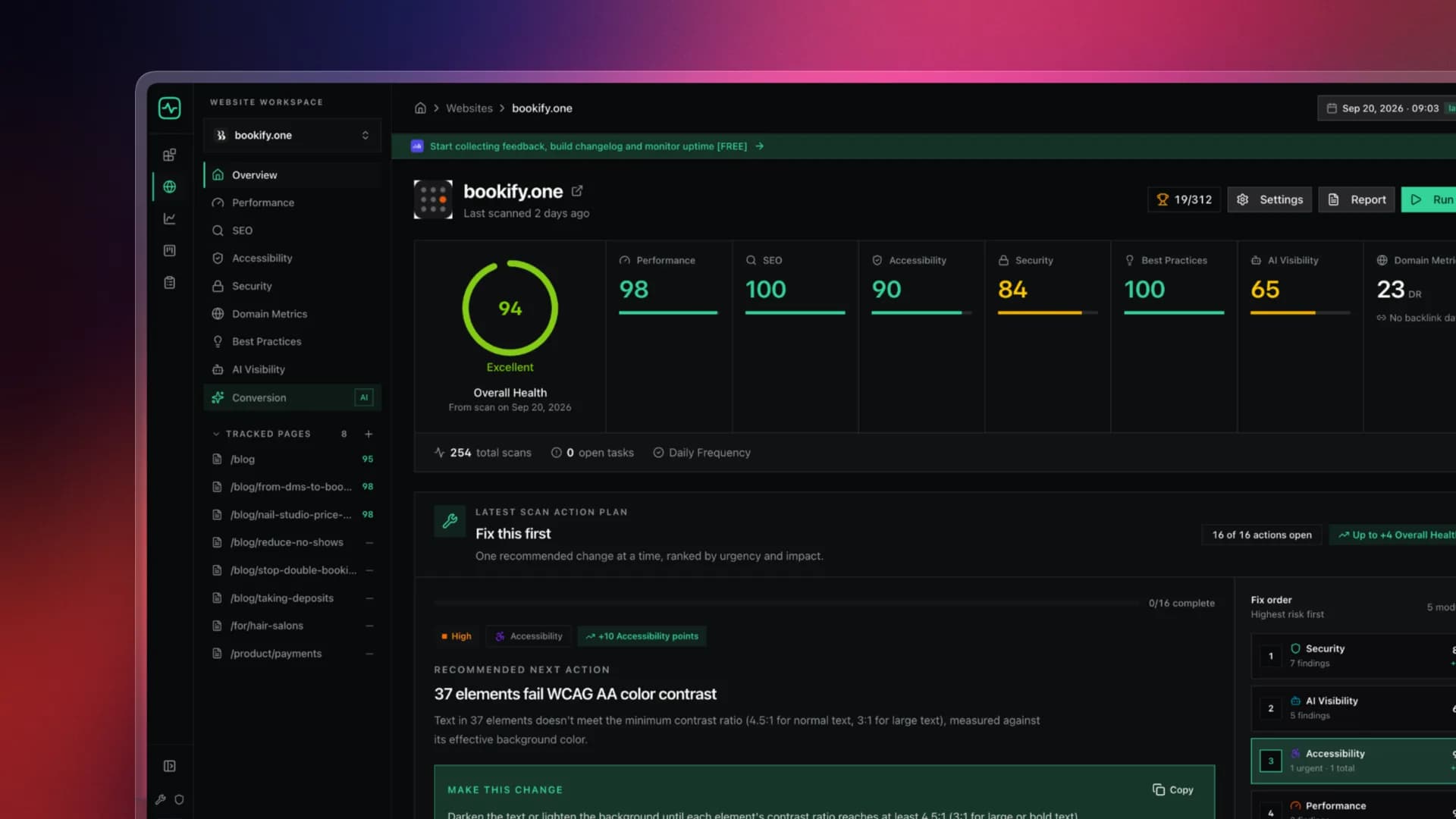
Most website audit tools give you a number and leave you to work out the rest. WebScore takes the opposite approach: you get a ranked to-do list, with the highest-impact fix at the top.
If you run your own site, whether it's a SaaS, a portfolio, a client project or a side hustle, you already know the feeling. You run Lighthouse, get a 67, see forty warnings, and have no idea which one actually matters. WebScore was built to fix exactly that.
What WebScore actually checks
One scan covers eight modules:
- Performance: slow assets, render-blocking scripts and layout shifts that make pages feel sluggish
- SEO: the on-page and technical signals that decide whether you get qualified search traffic
- Accessibility: issues that make your site harder to use for some visitors
- Security: headers, SSL and email authentication (SPF, DKIM, DMARC) that affect trust
- AI Visibility: whether ChatGPT, Claude, Perplexity and other AI tools can read and cite your content
- Conversion: an AI review of your pages, looking at them the way a CRO specialist would
- Best Practices: avoidable technical debt
- Domain Metrics: authority and backlink data behind the page Every finding is ranked by how many points it recovers. You start at the top, ship the fix, re-scan, and prove it moved. That loop (scan, prioritize, fix, verify) is the whole product.

Want to see a real report before signing up? Open the interactive demo.
The numbers so far
WebScore is still young, but the numbers show what it finds (as of September 2026):
- 375 websites audited
- 1,900+ scans run
- 33,100+ issues found
- 88 fixes per site on average
- 294+ founders and developers using it
The average site has 88 things it could fix. Nobody can fix 88 things at once, and that's why prioritization matters more than the score.
How it's different from Google Lighthouse
Lighthouse is great, and WebScore uses the same kind of performance signals. But Lighthouse stops at performance, accessibility, basic SEO and browser best practices. WebScore adds:
- Deeper SEO checks
- Security and email authentication
- AI Visibility, which is increasingly important as more search happens inside AI assistants
- Domain Metrics and backlink data
- Scan history and automated monitoring, so you catch regressions instead of discovering them months later Put simply, Lighthouse is a one-off test, and WebScore is an ongoing improvement workflow.
The AI Conversion Audit
This is the feature that surprises people most. WebScore takes desktop and mobile screenshots of your key pages and has AI review them for conversion problems: a vague value proposition, buried CTAs, missing trust signals, and friction in the sign-up path. You get annotated screenshots showing exactly where visitors hesitate, often with suggested copy you can paste straight in.
It works inside your AI coding tools
If you build with Claude Code, Cursor, Codex or Grok, WebScore offers a hosted MCP server. Your AI agent can scan a site, read the issues and fix instructions, pull domain metrics and toggle monitoring without you ever leaving the editor. You can literally type "audit my site and fix the top issue" and watch it happen.
Pricing: no subscription, ever
This is refreshing in a market full of $99/month SEO suites:
| Plan | Price | What you get |
|---|---|---|
| Free | $0 | Unlimited scans on any website, score preview across all modules |
| Single report | $3 | Every issue, its priority, and the exact fix, for one report |
| Lifetime | $29.99 once (rising to $49) | Unlimited sites and scans, all reports unlocked, monitoring for 10 websites, 10 AI Conversion audits/month, 20 AI Visibility credits/month, Google Search Console integration, MCP server, PDF exports, full history, plus 2 dofollow backlinks from a DR 40 site |
Every plan comes with a 14-day money-back guarantee. The Lifetime plan pays for itself after about ten report unlocks. Compare every plan feature here.
Free tools, no account needed
Not ready for a full audit? WebScore has 13 free standalone tools that each solve one problem:
- Image Compressor: shrink images without visible quality loss
- Image to WebP & AVIF Converter: switch to modern formats in seconds
- Favicon Checker and Favicon Generator
- robots.txt Tool: check what crawlers can and can't see
- Schema Markup Generator: structured data without writing JSON-LD by hand
See how your site compares
The WebScore Website Benchmark ranks scanned sites against each other. It's a fun way to see where you stand, and a good way to find well-built sites to learn from. You can also browse all scanned websites or read customer results.
What users say
One user on Peerlist said WebScore has been a life-saver for keeping their landing page performance in check. Yusuke Matsuba, the maker of LandingBoost, said he valued getting clear, actionable feedback rather than just a score.
Who should use WebScore
- Indie founders and SaaS makers who want to fix their landing page without hiring an agency
- Freelance web designers and SEO consultants who want a clean report to show clients before a pitch
- Developers who want audits wired straight into their AI coding workflow via MCP
- Anyone who has ever stared at a Lighthouse score and thought, "OK, but what do I do now?"
Try it
Enter your URL at webscore.now. It takes a free account and no credit card, and you'll have every module scored in under a minute.
Keep up with new features on the changelog, read the guides on the blog, or follow @WebScore_now on X.